
Dates in JSON: The Right Way
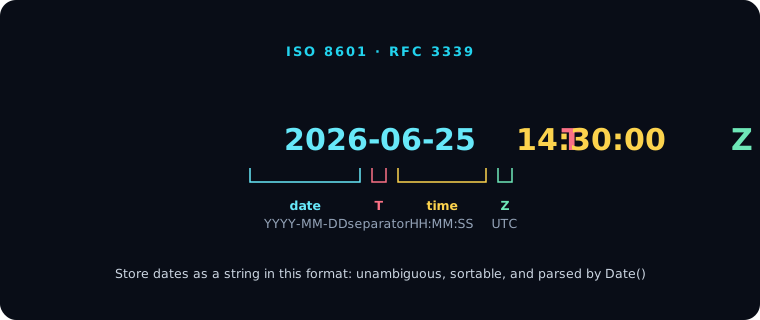
Quick answer: JSON has no date type — dates are stored as strings. The standard, portable choice is an ISO 8601 / RFC 3339 string in UTC, like "2026-06-25T14:30:00Z". It's unambiguous, sorts correctly as plain text, and is parsed natively by JavaScript's Date and most languages. Avoid locale formats and raw epoch numbers in public APIs. Validate date fields against a schema with the JSON Validator.
Why a string, and which one
Because JSON's only scalar types are string, number, boolean, and null (see The Six JSON Data Types), a date has to be encoded. The best encoding is an ISO 8601 string in UTC:
{ "createdAt": "2026-06-25T14:30:00Z" }
The T separates date and time; the trailing Z ("Zulu") means UTC. This format is:
- Unambiguous — no
MM/DDvsDD/MMconfusion. - Sortable as text — string comparison gives chronological order.
- Widely parsed —
new Date("2026-06-25T14:30:00Z")works in every browser, and equivalents exist everywhere.
For APIs specifically, follow RFC 3339, a strict profile of ISO 8601. Truncating to milliseconds (.sss) keeps you compatible across systems like Java and JavaScript.
Time zones
Two sound approaches:
- Store UTC with
Zand convert to the user's local time in the UI. Simplest and least error-prone. - Keep the offset when the local time itself is meaningful:
"2026-06-25T16:30:00+02:00". This preserves "what time was it there."
Don't store a naive local time with no offset ("2026-06-25 16:30:00") — it's ambiguous the moment it crosses a time zone.
Formats to avoid
- Locale strings —
"6/25/2026"or"25 June 2026"are ambiguous and unsortable. - Raw epoch numbers for public-facing data —
1781961000is valid JSON but unreadable, and people confuse seconds with milliseconds. Epoch is fine for internal, performance-sensitive paths, but document the unit. - Custom formats that need a bespoke parser. Stick to the standard.
Validate and parse safely
In code, parse explicitly rather than trusting Date to guess:
const iso = obj.createdAt;
const d = new Date(iso);
if (Number.isNaN(d.getTime())) throw new Error(`Bad date: ${iso}`);
You can enforce the format in a schema with "format": "date-time" — see JSON Schema Basics — and check fields with the JSON Best Practices Checker. For why Date objects don't survive a round-trip through JSON untouched, see Parse and Stringify (JSON.stringify(new Date()) already emits an ISO string).
Frequently asked questions
What date format should I use in JSON?
An ISO 8601 / RFC 3339 string in UTC, such as "2026-06-25T14:30:00Z". It's unambiguous, sortable as text, and parsed natively by most languages.
Does JSON have a date type? No. JSON only has strings, numbers, booleans, null, objects, and arrays. Dates are represented as strings (ISO 8601) or, less ideally, as epoch numbers.
Should I store dates as a timestamp number or a string? Use an ISO 8601 string for readable, public-facing data. Epoch numbers are compact and fast for internal use, but document whether they're in seconds or milliseconds.
How do I handle time zones in JSON dates?
Store UTC with a Z suffix and convert in the UI, or include the offset (+02:00) when the local time matters. Never store a local time with no offset.